Family
Family members
Add the people at home with a name and a colour, so tasks appear per person on the screen.
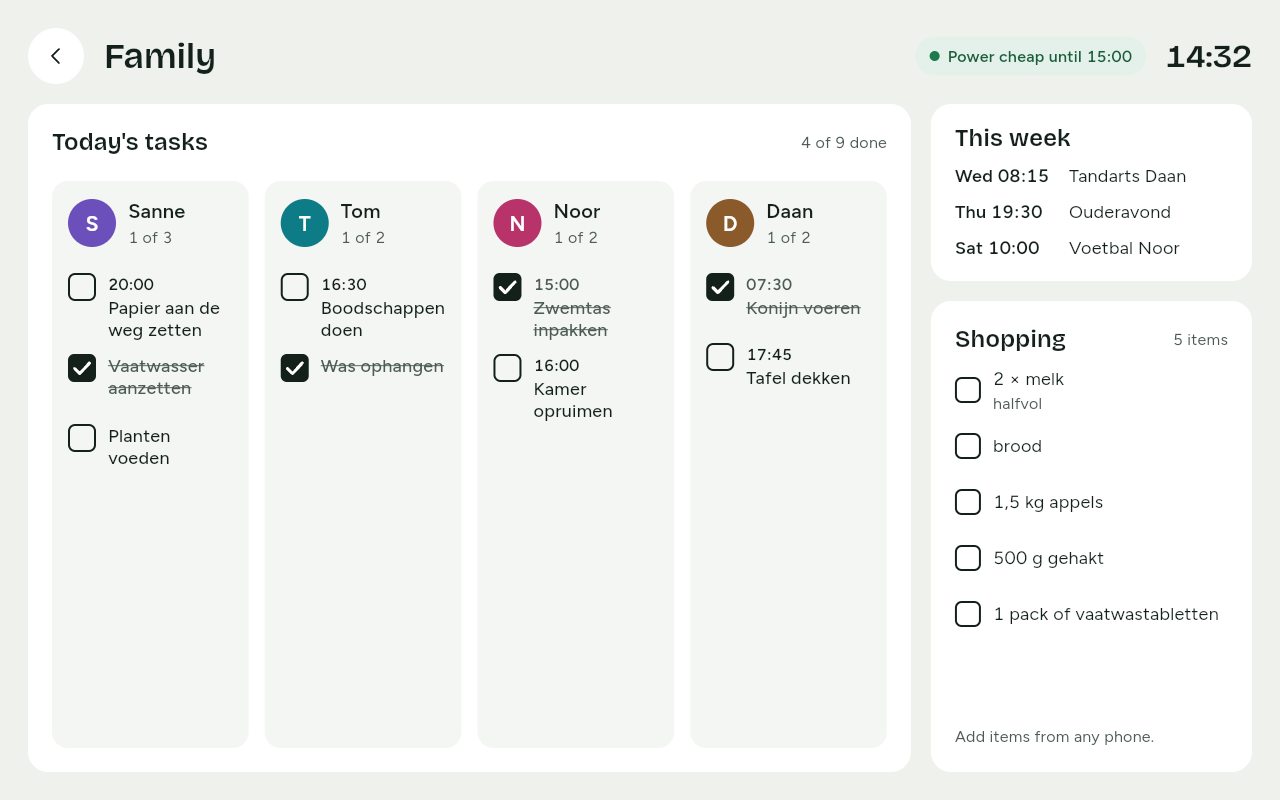
Every family member has a name and a colour. That puts tasks per person on the screen, so you see at a glance who still has something to do.
Adding a family member
During setup you add the family members on your phone: a name and a colour for each person. Later you add more or change them, also from your phone.
- A household has at most eight family members.
- Choose a different colour for everyone. The first letter or the name always appears beside the colour, so people who find colours hard to tell apart still see who is who.
- The colours for family members are a set of their own, apart from the energy colours. So a person is never mistaken for a cheap or expensive price.
Children and adults
- Children do not get an account. For them, Thuisbord stores no more than a first name and a colour. They tick off their tasks on the screen on the wall without signing in.
- Adults can have an account of their own. Invite other adults; they sign in on their own phone to add tasks, shopping and photos. A family member can be linked to an adult's account, but does not have to be.
On the screen
On the Family screen, every family member has a column of their own under Today's tasks, with their colour, their first letter and how many tasks are done, for example 1 of 3. Tasks without a family member are under Everyone.
For a new task you choose the family member at For whom?. Read on in Tasks.